⛔ 문제사항
어쩌다보니 Vue까지 하게 됐는데 (땀땀) 묘하게 거슬리는 워닝이 자꾸 떠서 살펴보니 이런 경고였다.
Failed to write the global types file. Make sure that: 1. "node_modules" directory exists. 2. "vue" is installed as a direct dependency. Alternatively, you can manually set "vueCompilerOptions.globalTypesPath" in your "tsconfig.json" or "jsconfig.json". If all dependencies are installed, try running the "vue.action.restartServer" command to restart Vue and TS servers.vue(404)
✅ 해결방안
사실 워닝 자체에 해결방법이 다 쓰여져 있기 때문에 크게 어려운 점은 없을 것이다.
- node_modules가 있는지 확인할 것
- vue의 의존성이 제대로 설치 되어있는지 config.json파일을 확인할 것
- 모두 확인해봤는데 안 된다면 vue 서버를 재실행할 것.
1. node_modules 확인하기
일반적으로 node_modules가 없기란 힘들다. 있기도 하니 고로 1번은 패스.
2. vue 의존성 및 jsconfig.json 파일 확인하기
vue의 의존성이 제대로 되어있는지 아래 명령어를 통해 확인해보니,
npm list vue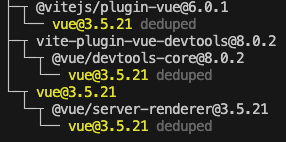
딱히 문제는 없어보였다. 그렇다면 tsconfig.js 혹은 jsconfig.js를 수정하면 된다.
{
  "compilerOptions": {
    "target": "ES2020",
    "useDefineForClassFields": true,
    "lib": ["ES2020", "DOM", "DOM.Iterable"],
    "module": "ESNext",
    "skipLibCheck": true,
    "moduleResolution": "bundler",
    "allowImportingTsExtensions": true,
    "resolveJsonModule": true,
    "isolatedModules": true,
    "noEmit": true,
    "jsx": "preserve",
    "strict": true,
    "noUnusedLocals": true,
    "noUnusedParameters": true,
    "noFallthroughCasesInSwitch": true,
    "baseUrl": ".",
    "paths": {
      "@/*": ["./src/*"]
    }
  },
  "include": [
    "src/**/*.ts",
    "src/**/*.tsx",
    "src/**/*.vue",
    "src/**/*.js",
    "src/**/*.jsx"
  ],
  "exclude": ["node_modules", "dist"],
  "vueCompilerOptions": {
    "globalTypesPath": "./node_modules/vue/global.d.ts"
  }
}
jsconfig.js 파일도 위와 같이 수정.
공교롭게도 난 그래도 안 됐다.
3. vue server 재실행
그렇다면 이제 뷰서버를 재실행하는 방법만 남았으니 cmd + shift + p 단축기를 이용하여 아래 명령어를 검색한 뒤 실행한다.
Vue: Restart Vue server
워닝이 알려준 절차대로 하니 깔끔하게 워닝이 사라진 모습을 볼 수 있다.
만약 그래도 워닝이 사라지지 않는다면 vsc 자체를 껐다 켜보는 것도 추천한다.
'etc' 카테고리의 다른 글
| localhost:8080 모바일에서 열기 (0) | 2025.12.16 |
|---|---|
| 문제해결 : zsh: command not found: ls (0) | 2025.10.02 |
| 스파르타 국비지원 내일배움캠프? 경력직이 듣기엔 어떨까? (8) | 2024.10.13 |
| 모의면접 준비 2차 (0) | 2024.09.26 |
| 모의면접 준비 1차 (0) | 2024.09.12 |